Designing Coach Maya an AI Coach for Just-in-Time Leadership Support
Managers often need support in the moment, not weeks later like traditional coaching. I designed Coach Maya, an adaptive AI coach that delivers context-specific guidance through voice or text by shaping the coaching flow, response behavior, and memory system behind each conversation. Maya supported 1,000+ learners, completed 350+ sessions in its first month, and contributed to the acquisition of Praxis Labs.

About
Praxis Labs
Praxis Labs’s mission is to make workplaces work better for everyone by helping organizations teach their leaders to build inclusive leadership skills through assessment, roleplay, and coaching.
Coach Maya
Before becoming a standalone product, Maya was a coaching guide inside Praxis’s learning experiences. She supported learners during practice with advice, reflection, and teaching moments. Clients found her valuable enough to want access beyond a single scenario.
roleAs the sole designer, I led end-to-end design, shaping the coaching experience across conversation flow, UI, and AI behavior in close partnership with product, learning science, and engineering.
TeamProduct Designer
Product Owner
2 Learning Designers
2-3 Software Engineers
1 QA Engineer
ResponsibilitiesProduct Design
Visual Design
Conversation Design
AI Behavior Design
Usability Testing
design processDiscover
Partnered with clients, ran interviews, and analyzed early signals to uncover where managers needed the most support.
Define
Framed the problem and success criteria. Focused on making AI coaching distinct from generic chatbots by emphasizing warmth, memory, and actionable strategies.
Develop
Built and tested multiple prototypes. I designed flows, visuals, and conversation norms. We refined in weekly usability loops.
Deliver
Shipped an alpha within two weeks, followed by a beta with enterprise clients, bringing Maya into live use across 1,000+ learners.
01
Discover

The Problem
Roleplay helped managers practice, but real leadership moments don’t always fit a scenario. Early interviews and client requests surfaced three needs:
In-the-moment coaching for any leadership situation
Guidance grounded in the manager and company context
Clear, specific, practical advice
02
Define
The Challenge
To make that work, the product needed to:
Feel coach-like, not like generic AI chat
Meet enterprise expectations for trust, reliability, and safety
Deliver value for any leadership moment and end in action
Integrate seamlessly into our existing platform
Our Approach
We designed Maya to:
Deliver coaching that feels actionable in the moment
Create a warm, coach-like experience that feels natural
Ground guidance in the learner and company context
03
Develop
Evolving the ExperiencePhase 1: Concept Validation
Phase 2: Product Refinement
Phase 3: Alpha Release
Tested early prototypes with buyers and clients to validate the core flow, value, and coaching experience.
Fast 1–2 week design–build–test cycles with success targets, such as:
• 80%+ ease of use
• 80%+ helped think differently
• 70%+ would recommend
• 70%+ would use again
• 40%+ very disappointed if removed
Shipped a working prototype with voice and text coaching, memory, and summaries.
Phase 4: Beta Release
Expanded to all clients with the authoring feature and conversation improvements.
Guide sessions toward clear, actionable coaching
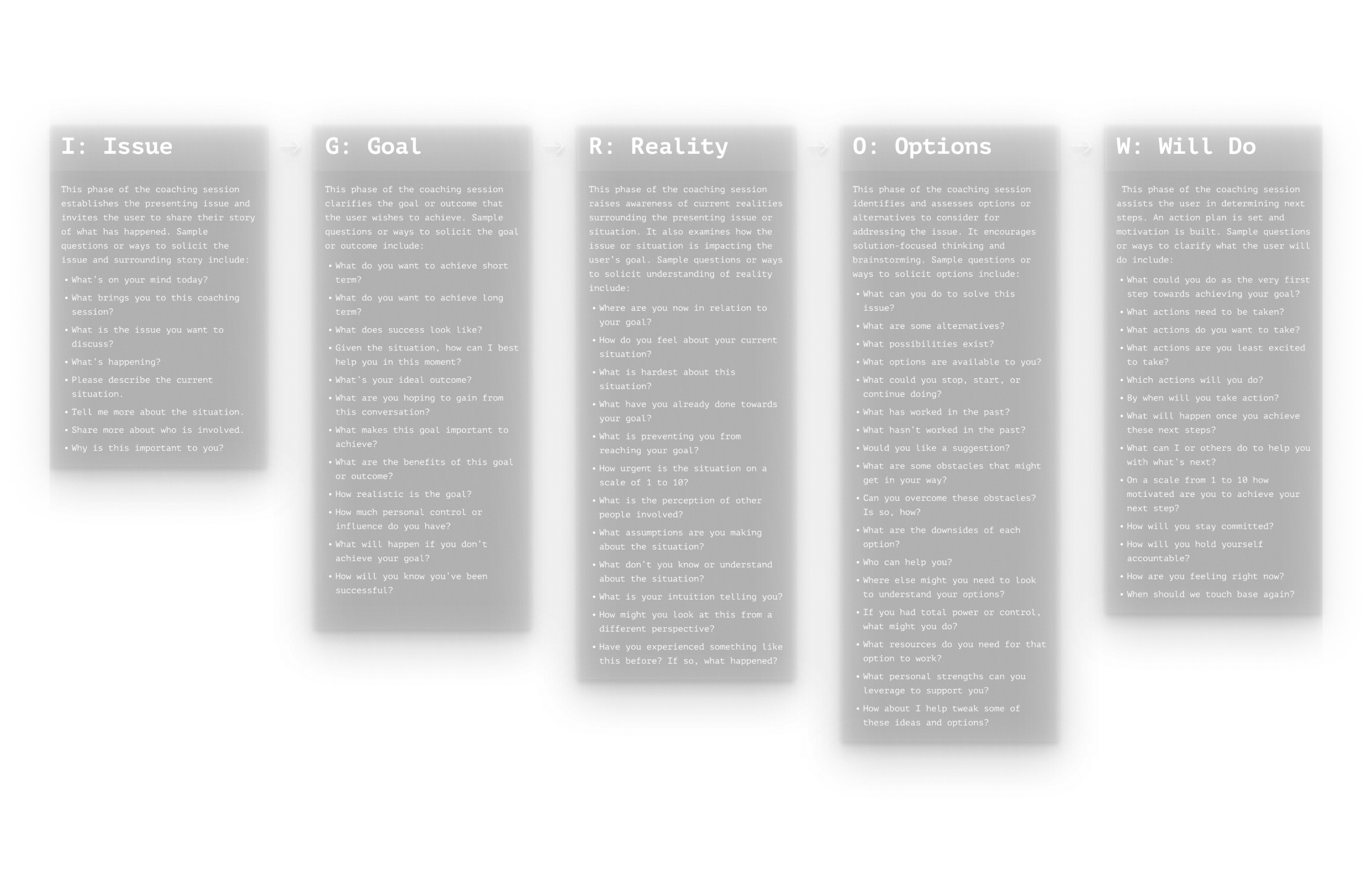
We used iGROW to structure sessions, but testing showed Maya sometimes stayed in reflection too long. Some users ended sessions early because it felt circular and they didn’t see value quickly.
I partnered with learning science to tighten the flow so sessions moved forward and matched what the learner needed in the moment:
Let learners pick a reflective or tactical coaching style up front
Kept iGROW, but progressed intentionally based on their chosen style
Proactively offered templates, resources, and recommended frameworks so advice felt specific and actionable
Sessions became more predictable and actionable while still feeling human. Clients appreciated how adaptable Maya felt.
Close every session with a plan learners can use
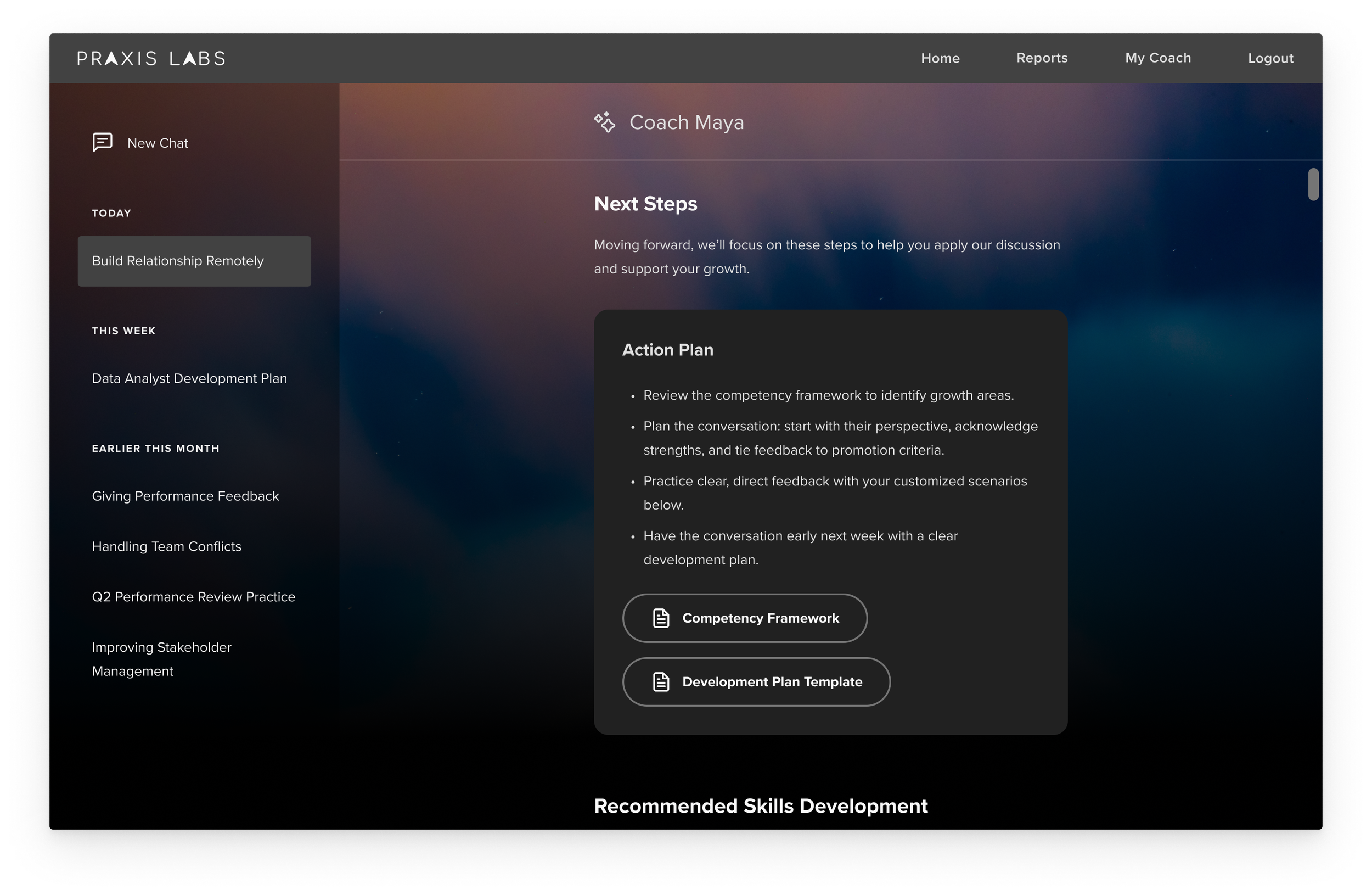
Early prototypes didn’t include a wrap-up for voice sessions. From our AI roleplay product, we learned learners need a takeaway, clear next steps, and something to reference later.
I designed a structured wrap-up so learners left with a clear plan:
Gave learners concrete next steps tailored to their challenge
Recommended a roleplay based on the conversation to keep learning active
Provided a transcript for review and reflection
In usability tests, wrap-ups became one of Maya’s most valued features. In beta, higher wrap-up engagement correlated with higher re-engagement.
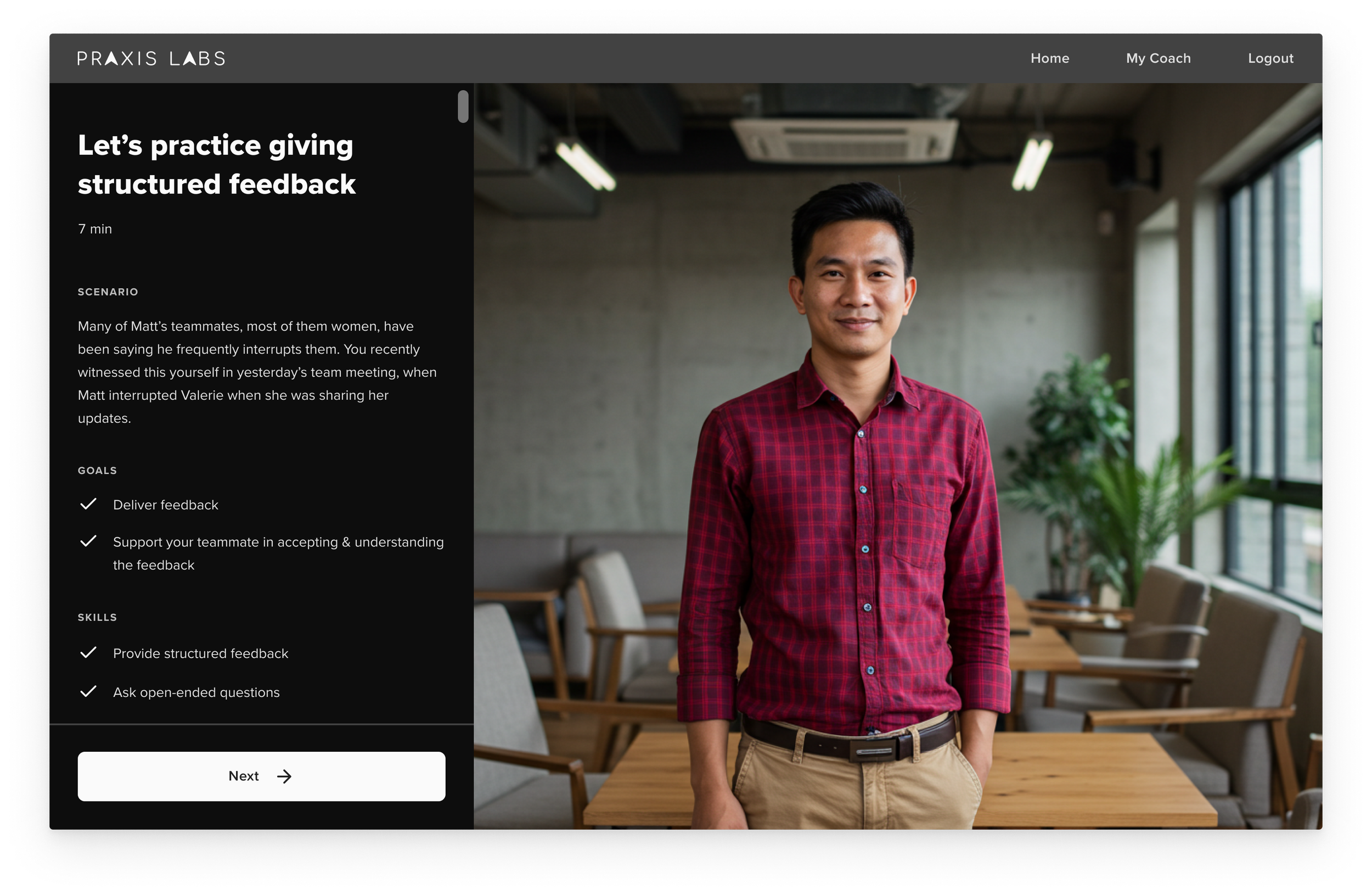
Turn coaching into practice with custom roleplay
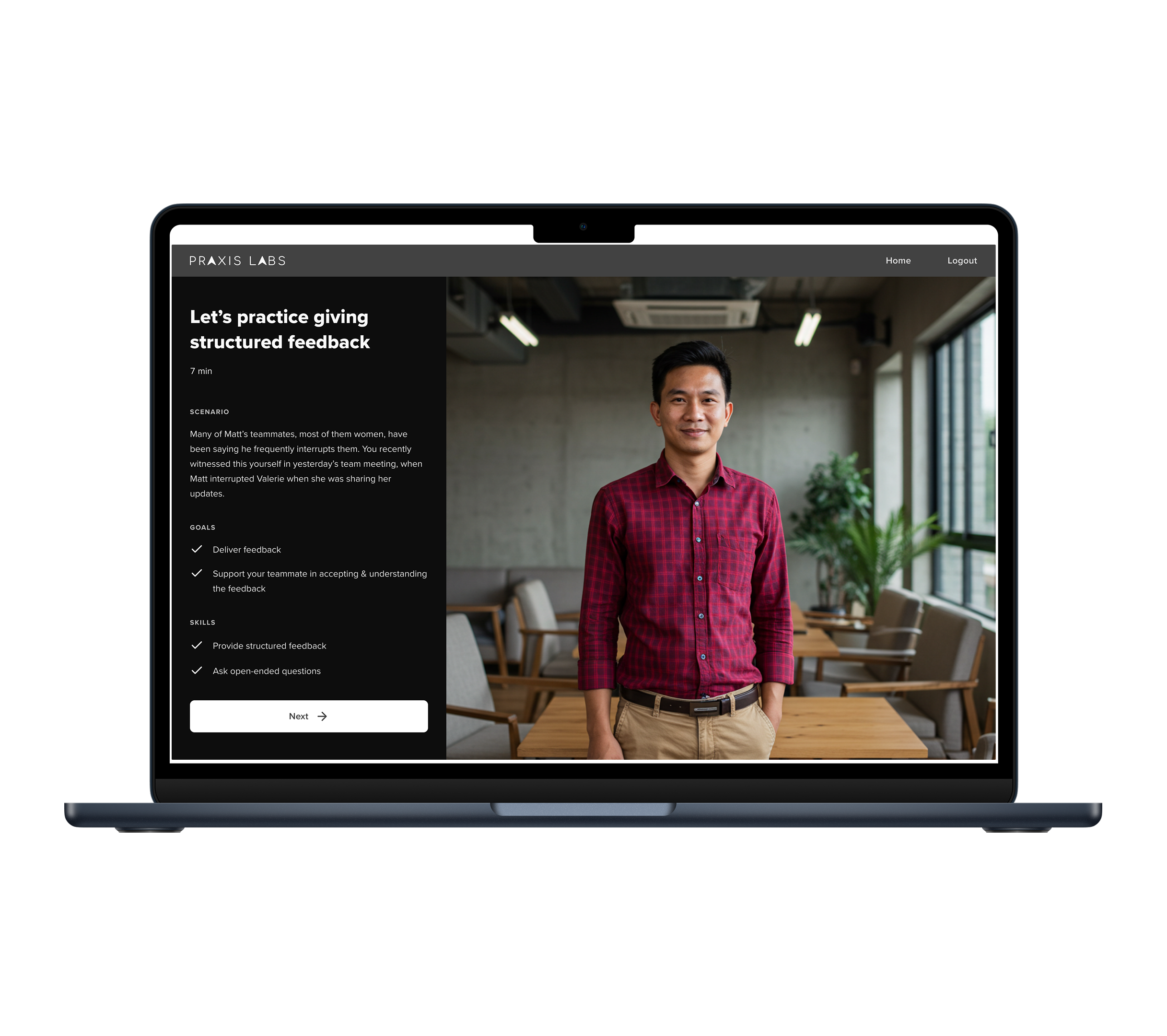
In usability tests, learners wanted to practice their real situations, not generic scenarios. Our first attempt let learners customize a roleplay in Pivotal Practice through text input, but it added too much friction, and no one chose to do it.
We moved custom roleplay authoring into a voice session with Maya so learners could create it fast:
Maya asked a few short questions to capture the situation and write the scenario
Learners could edit and refine the scenario if needed
Maya creates custom scenarios by either adapting an existing roleplay or generating a new one as needed
Custom scenarios included the appropriate 2-3 skills to practice and a coaching report afterward.
In testing, this became a top feature because learners could practice the exact situation they were facing in a concrete, actionable way. Clients valued building scenarios from their own context.
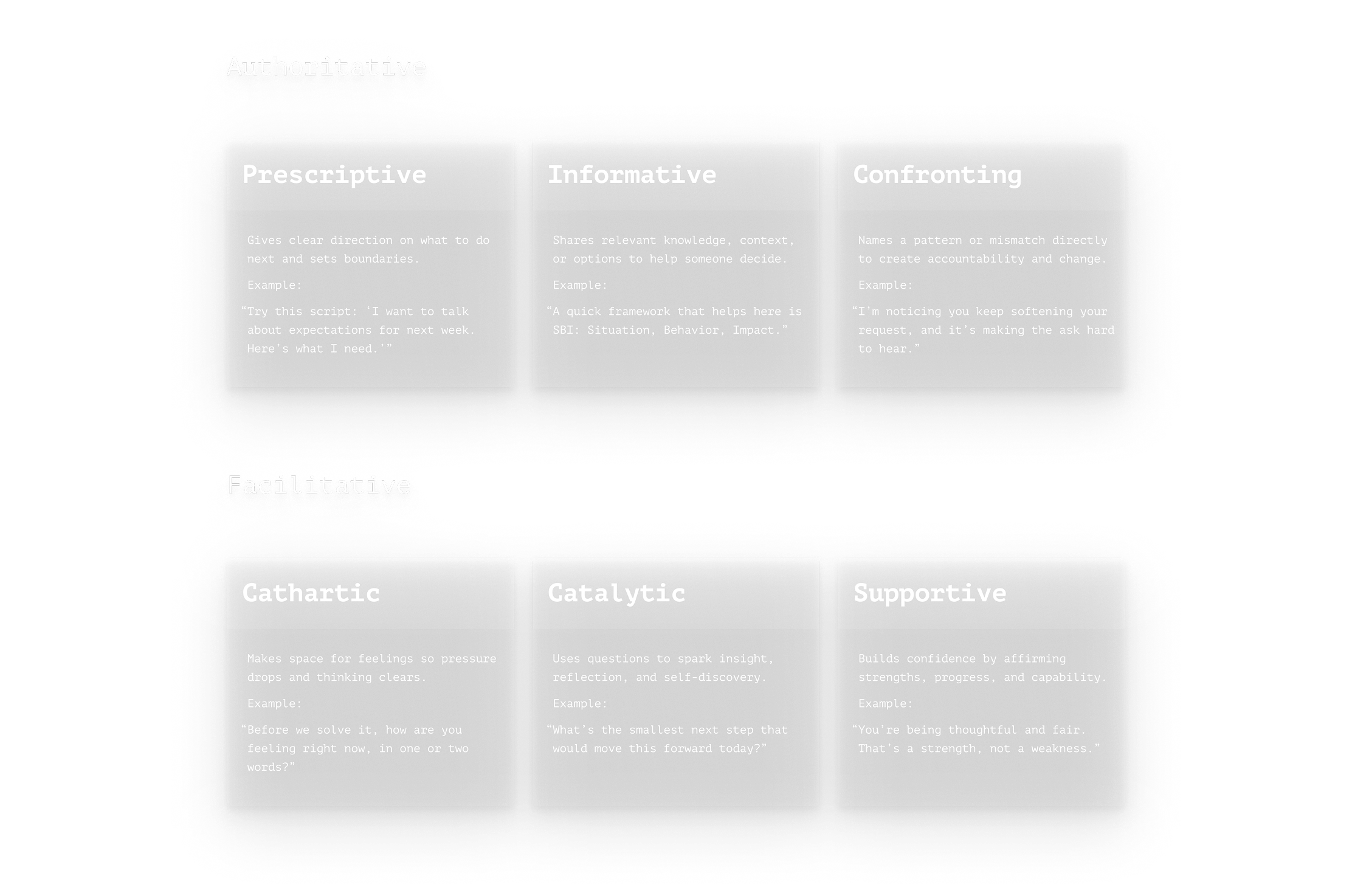
Make coaching feel warm without slowing people down
We designed Maya to use a mix of coaching styles, but in testing, users said she leaned too heavily on reflection and encouragement, which slowed sessions and led to early drop-offs.
I partnered with learning science to refine coaching behaviors so Maya stayed supportive while keeping conversations efficient.
Reduced affirmations and restating so that warmth felt authentic
Reduced repetition and tightened responses to improve pacing and decrease time to value
Upgraded the voice model and LLM to improve voice quality, tone, turn-taking, and overall flow
After improving the flow, users stayed longer and rated the experience higher in testing. Clients valued Maya’s humanness and said it was a key differentiator.
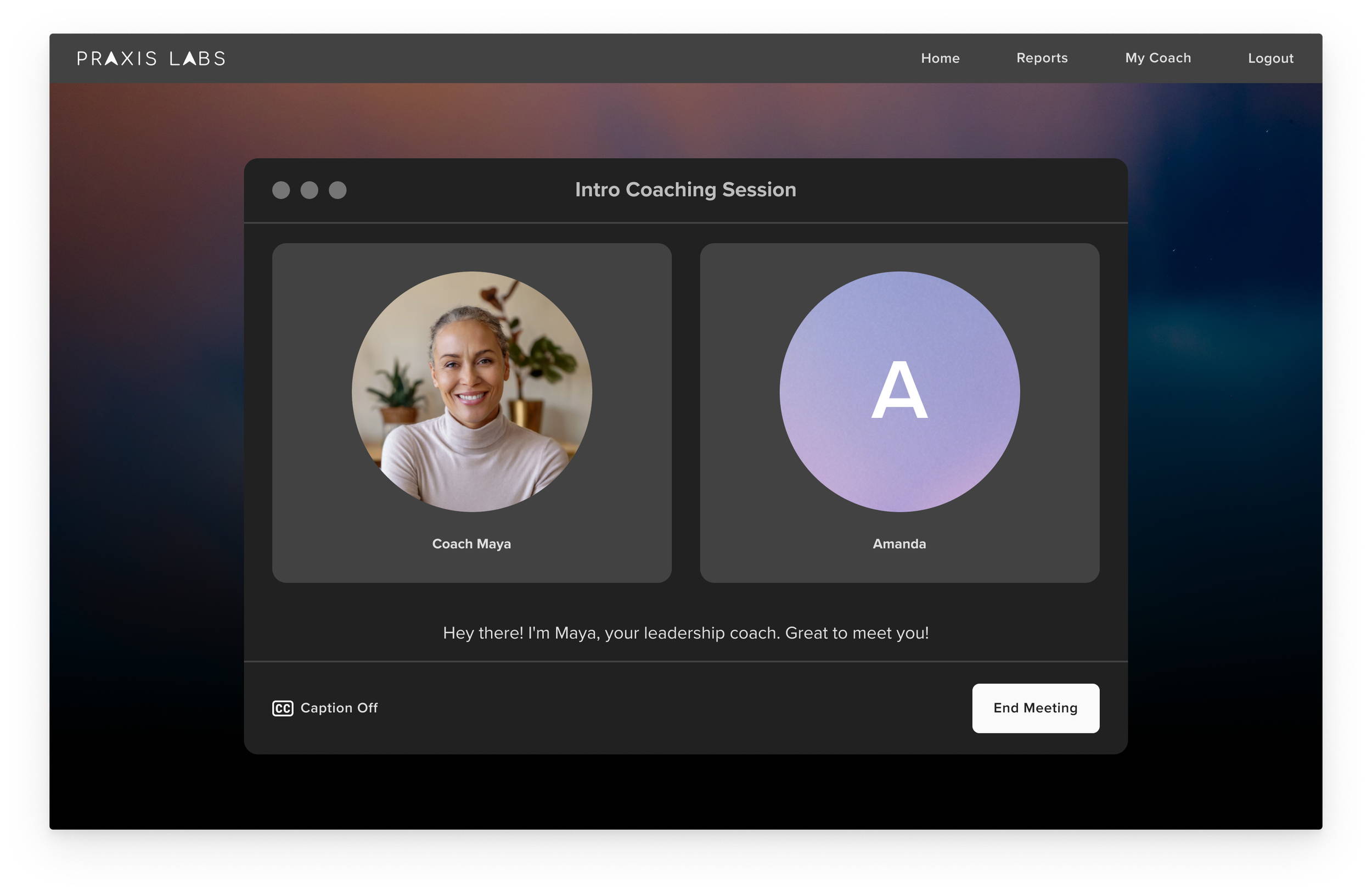
Design voice coaching to feel like a real conversation
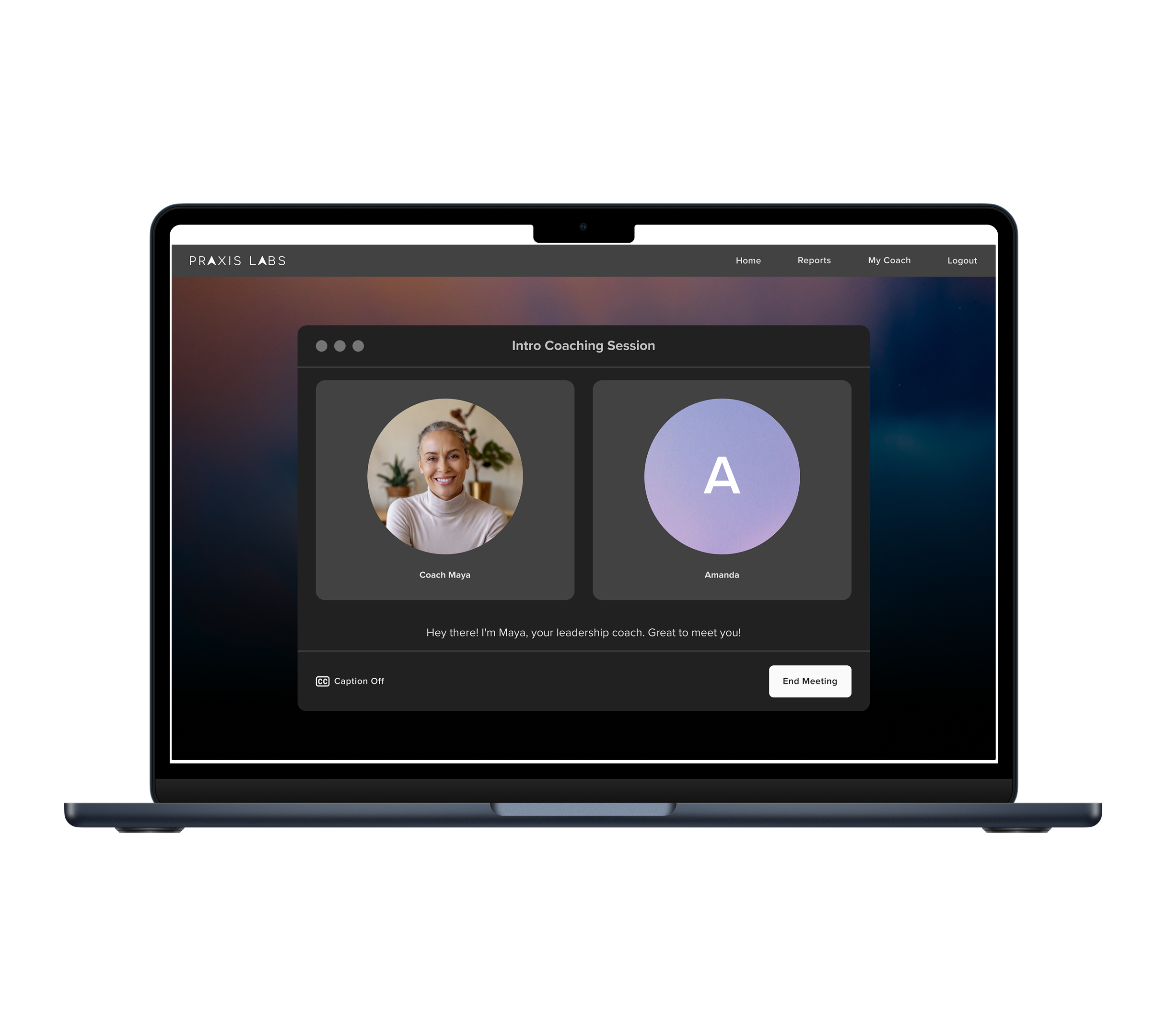
We learned from Pivotal Practice that a video meeting UI helps the interaction feel immersive and intuitive. We reused that pattern so voice coaching felt like talking to a real coach.
I designed the voice session to feel warm, engaging, and easy to use:
Had Maya speak first to signal it was a live conversation
Added mic and voice indicators so users knew when they were heard and when Maya spoke
Included live captions for accessibility and comprehension
Designed a default coach photo that felt approachable and human
In testing, learners appreciated the voice option for ease of use and stayed engaged longer, averaging 15–20 minutes.
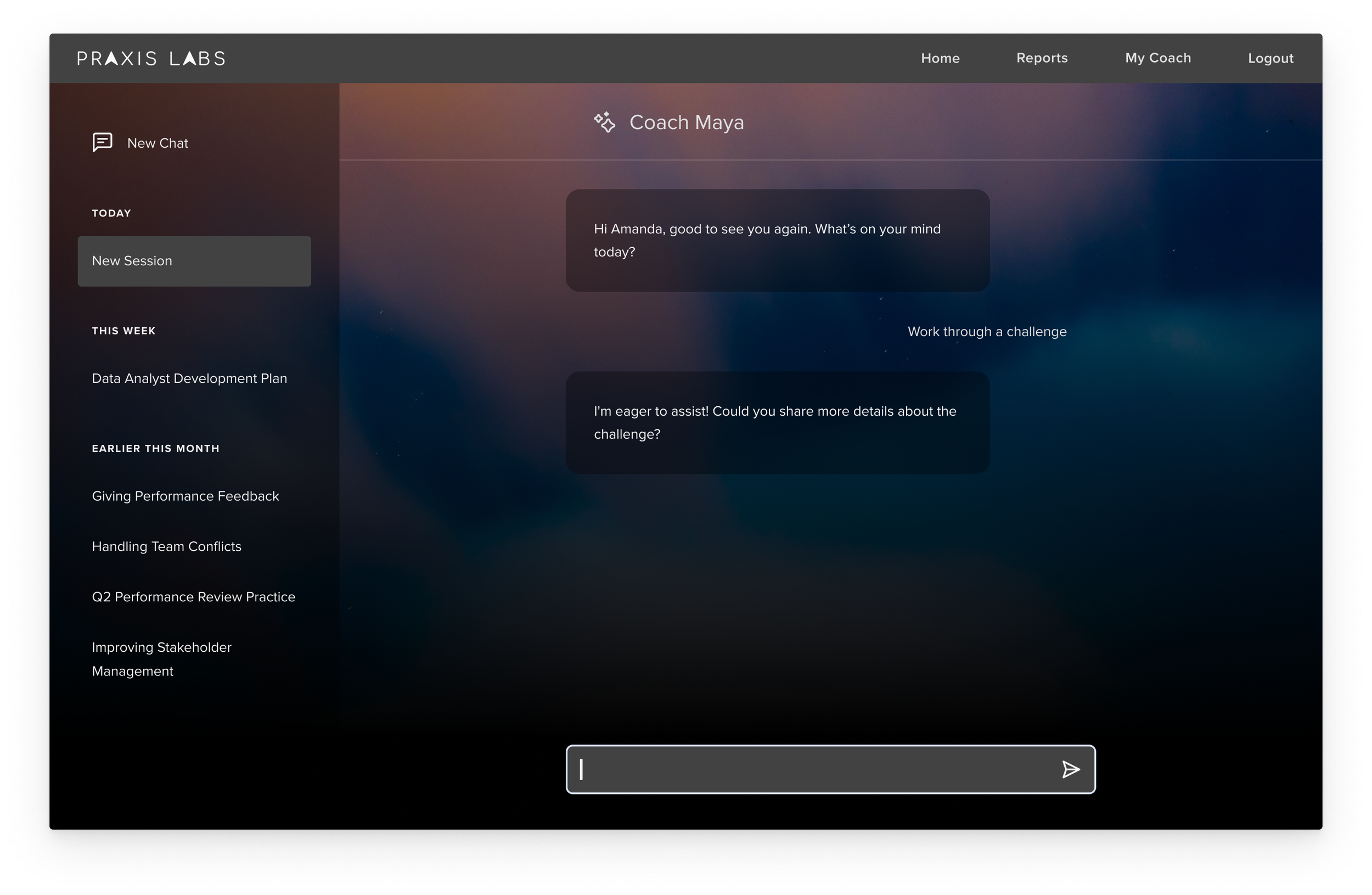
Make text coaching feel distinct but familiar
We didn’t want the text coaching UI to look like a generic AI chat, but I did want to keep familiar patterns so it stayed easy to use.
I designed the chat UI so it felt branded and calming without reinventing chat:
Kept the core chat layout and message pattern so it stayed intuitive, while making the visuals feel distinct
Added a calming day-to-night sky photo with stars to signal reflection and change, and to subtly represent AI.
In testing and demos, people responded positively to the visual design, and the experience still felt familiar and easy to use.
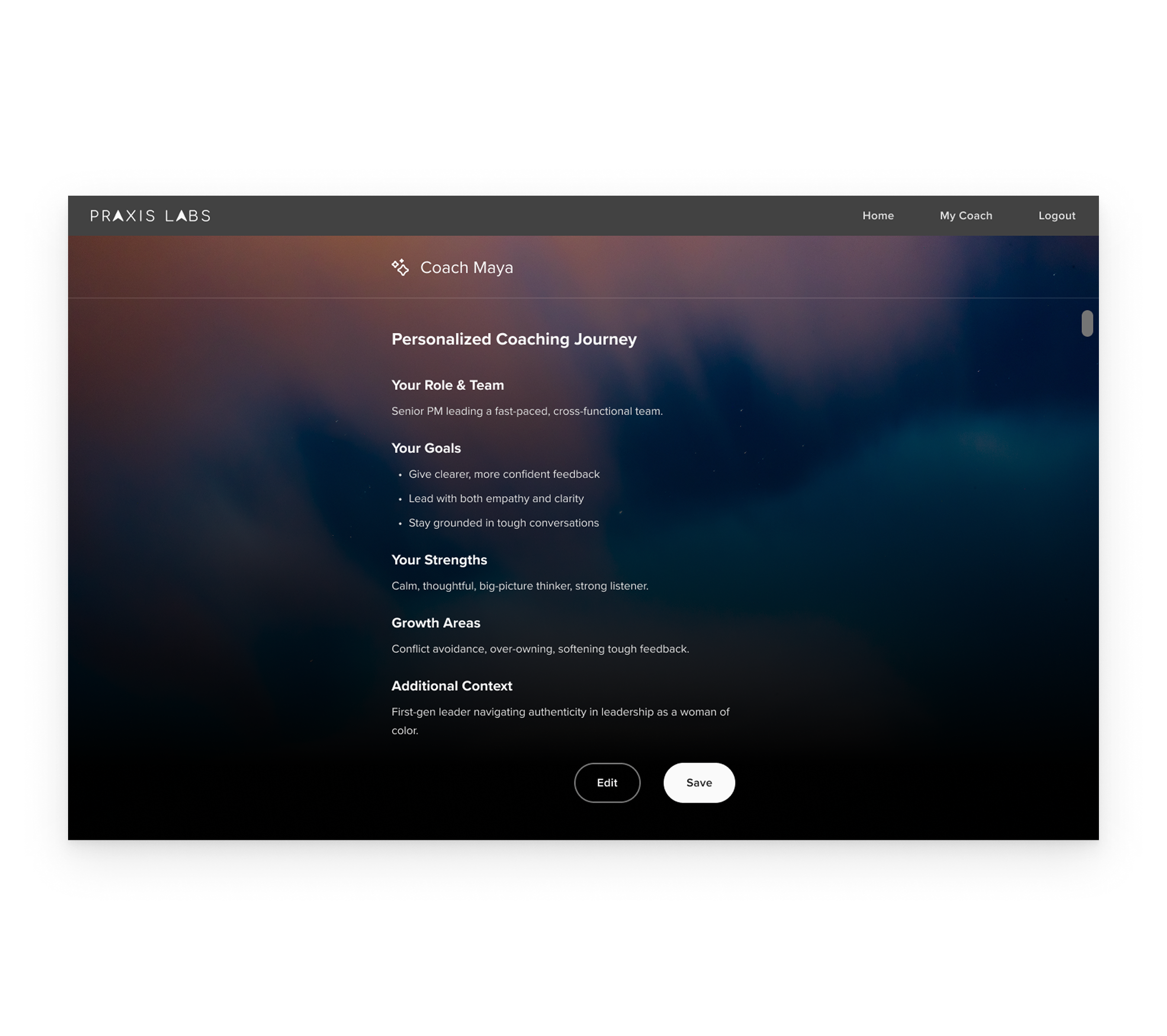
Use memory to make coaching feel personal and useful
In early prototypes, every session started without user context. Without memory, Maya risked sounding generic, which made her guidance less relevant and engaging.
Engineering built the memory system, and I designed how it showed up so learners understood it and stayed in control:
Let learners review and edit their profile memory for accuracy and control
Used the learner’s background, insights, and past sessions to keep coaching relevant
Made memory visible when referenced to build trust and credibility
In testing, users said Maya’s memory of them made the coaching feel more personal and efficient. 81.8% of learners found memory recall helpful in testing.
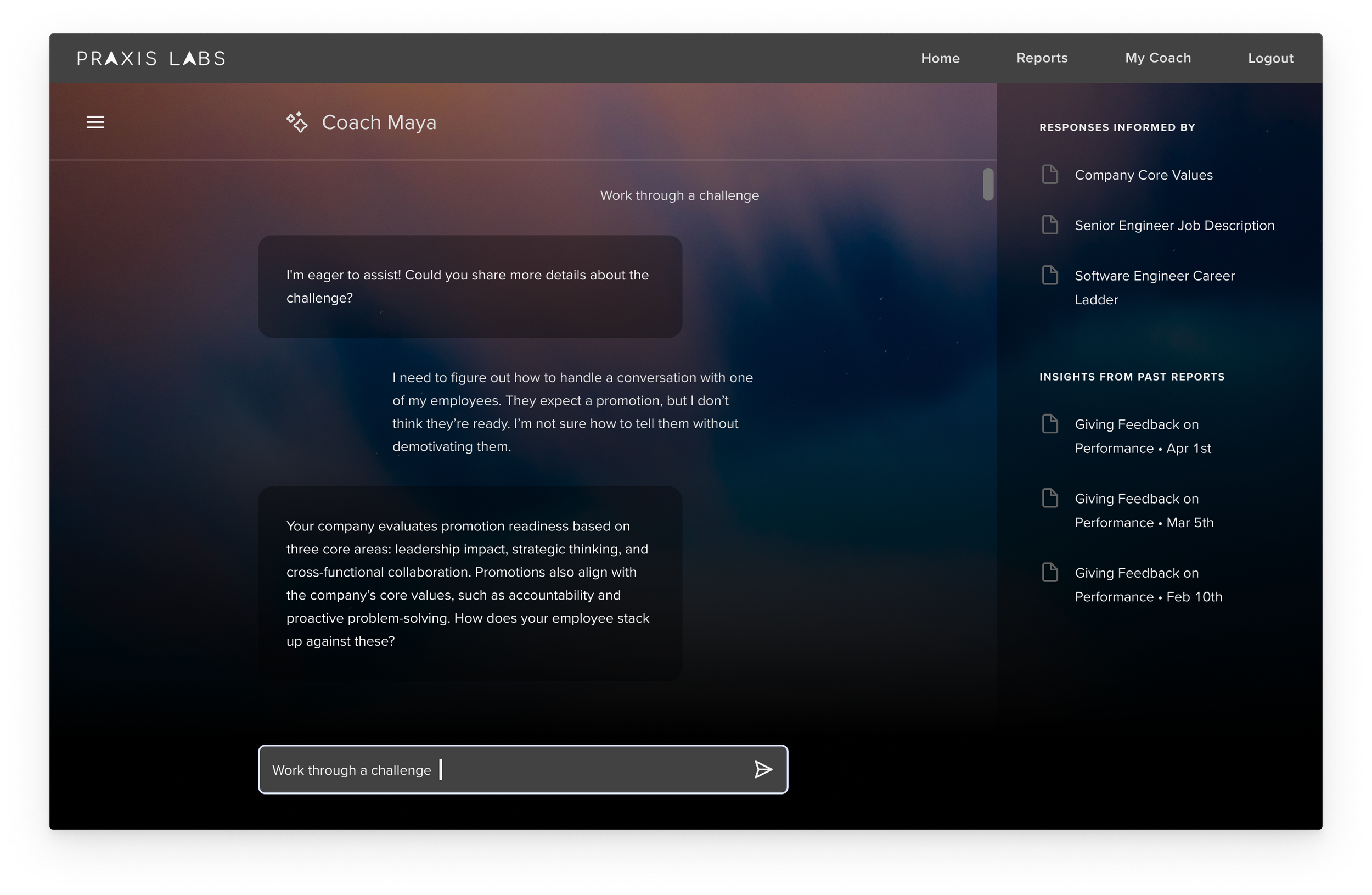
Use company context to make coaching more relevant
In demos, clients wanted coaching grounded in their own content, like their values, language, and policies. Without that context, guidance could feel generic or risky to apply at work.
I designed how the company context showed up so guidance felt credible and easy to reference:
Surfaced reference resources in chat through a side panel to build credibility
Made it easy to open details without leaving the conversation
Included reference resources in voice summaries for review and next steps
Wove values and policies into advice naturally
Org-aware coaching felt more relevant and trustworthy. Enterprise clients cited this as a key driver of adoption.
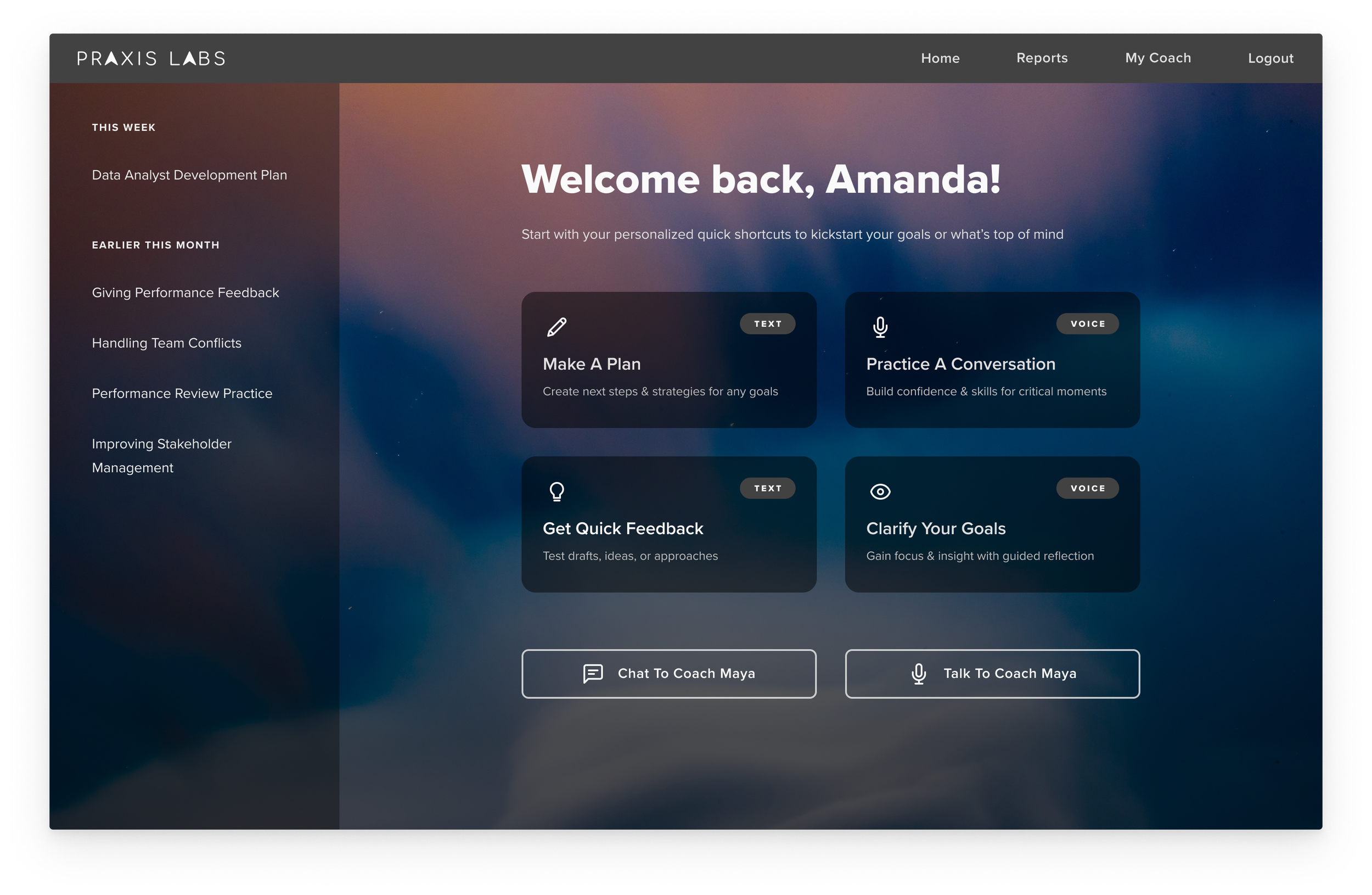
Let learners choose the right mode for the moment
In testing, learners preferred different modes depending on the moment. Voice worked better for reflection and processing. Text was faster for co-creating outputs and getting quick feedback.
I added guidance on the coaching landing page so learners could choose the right mode quickly:
Added quick-start entry points into either mode
Positioned voice for reflection, longer sessions, and roleplay creation
Positioned text for quick tactical feedback and co-creation
In the first month after the beta launch, 66% of sessions were text, and 34% were voice, showing that people used both depending on the situation.
04
Deliver
Scenario Creation Walkthrough
This video shows a learner creating a custom roleplay with Coach Maya. Maya captures the situation with a few prompts, generates a practice-ready scenario, and transitions directly into roleplay.
Highlights
• Conversation-based authoring
• Quick personalization
• Clear handoff into practice and next steps
05
Impact
Business Outcome
Generated 3 LOIs
Generated 3 LOIs within weeks of launch, signaling acquisition interest
Acquisition Key Factor
Coach Maya contributed meaningfully to Praxis Labs’ acquisition by Torch
Strong Market Signal
Across clients, Maya is being scaled into leadership programs, embedded into company frameworks, and tapped for strategic insights.
Learner Outcome
350+ Sessions in the First Month
Across 6 enterprises through organic discovery (8–11 min avg)
45% Repeat Engagement
Returned for multiple sessions in the first two weeks
71% Voice Completion Rate
Users completed the voice session with Maya from start to end
Learner Quotes

It felt like Maya was warm and understanding, and it made me want to share.
I felt like I was talking to somebody knowledgeable who could then give me advice. I’m impressed Maya understood and responded appropriately to my challenge.
It felt natural. Maya understood exactly what I said and gave feedback that matched exactly what I answered.
Maya actually has a memory that makes it easy and efficient because I don't have to continuously tell Maya what the issue is.
06
Learnings
This work pushed me beyond screen design into coaching structure, pacing, and AI behavior.
Designing the conversation itself
Treated pacing, turn-taking, and reaching next steps as core UX quality signals
Iterated on conversation flows like a funnel because drop-offs often meant the session wasn’t landing
Making AI feel more human
Calibrated warmth and pacing so coaching stayed supportive without feeling repetitive
Client feedback reinforced that humanness materially changed adoption
Defining quality with the team
Helped learning science refine prompts and behavior rules when needed
Validated changes through scripted scenarios and team testing, highlighting the need for shared evaluation